Cancel Order
 Logo Slider
 Cart Reservation
 Magic Menu
 PageSpeed
 DeleteX
 ChargeMe
 Age Restriction 18+
 DocumenThemix
 Agile Search
 Newsletter Popup
 IConvert Promotion
 Trusty Sale Proof
 Countdown x Bar
 Xleft
Xleft Jump to Checkout
 PrestaSEO AI++
 Accessibility Guard
 SOO Agent Gateway
 SOO Agent Catalog Tools
 SOO Agent SEO Tools
 GDPR
GDPR Create a new account
PrestaShop PHP Version Compatibility Chart
Which PHP version is compatible with PrestaShop? The short answer depends on your PrestaShop version: PrestaShop 9 requires PHP 8.1 or newer, while older PrestaShop 8, 1.7 and 1.6 stores need stricter version matching.
Use this compatibility chart before changing PHP on your server. A wrong PHP upgrade can break modules, overrides, checkout or the back office.
PrestaShop PHP compatibility quick chart
| PrestaShop version | Compatible PHP versions | Recommended action |
|---|---|---|
| PrestaShop 9.1 | PHP 8.1, 8.2, 8.3, 8.4, 8.5 | Use the latest supported PHP available on your hosting after testing modules. |
| PrestaShop 9.0 | PHP 8.1, 8.2, 8.3, 8.4 | Target PHP 8.4 for new PS9 deployments when your modules support it. |
| PrestaShop 8.x | Version-specific; commonly PHP 7.2.5-8.1 | Check your exact minor version before upgrading PHP. |
| PrestaShop 1.7.8 | Commonly PHP 7.2-7.4 | Do not jump to PHP 8 without staging tests. |
| PrestaShop 1.6 | Legacy PHP 5.6-7.1 environments | Plan migration instead of modern PHP upgrades. |
For server-level details, read the PrestaShop requirements guide. For module risk, read how to check PrestaShop 9 module compatibility.
Meeting the system requirements for PrestaShop will help keep your online store from encountering unexpected errors.
Switching your current PHP version to the latest will definitely make your store faster; however, each PrestaShop version only supports certain PHP.
Let's see what version of PHP your online store will be ready with.

PrestaShop 1.6 supports PHP version 5.2 to 7.1
This PS version was released in 2014. This PS supports PHP 5.2 to PHP 7.1. At that time, upgrading from PS 1.5 to 1.6 was a painful, nearly "shattering to reconstruct" process.
PrestaShop 1.7 is compatible with PHP version 5.4 to 7.4
The first stable version of PS 1.7 was released in November 2016. You can install PHP 5.4 to PHP 7.4 on your web server to host your online store.
The 3 most commonly used at the moment are PHP 7.2, PHP 7.3 and PHP version 7.4.
PrestaShop 8 needs PHP 7.2.5 to 8.1 on your server.
The newest version of PrestaShop has been released in November 2022. This latest PrestaShop package (now PrestaShop 8.0.3) works as an open source project and supports the latest PHP version 8.1. It's also compatible with PHP 7.3 as well as compatible with PHP 7.4.
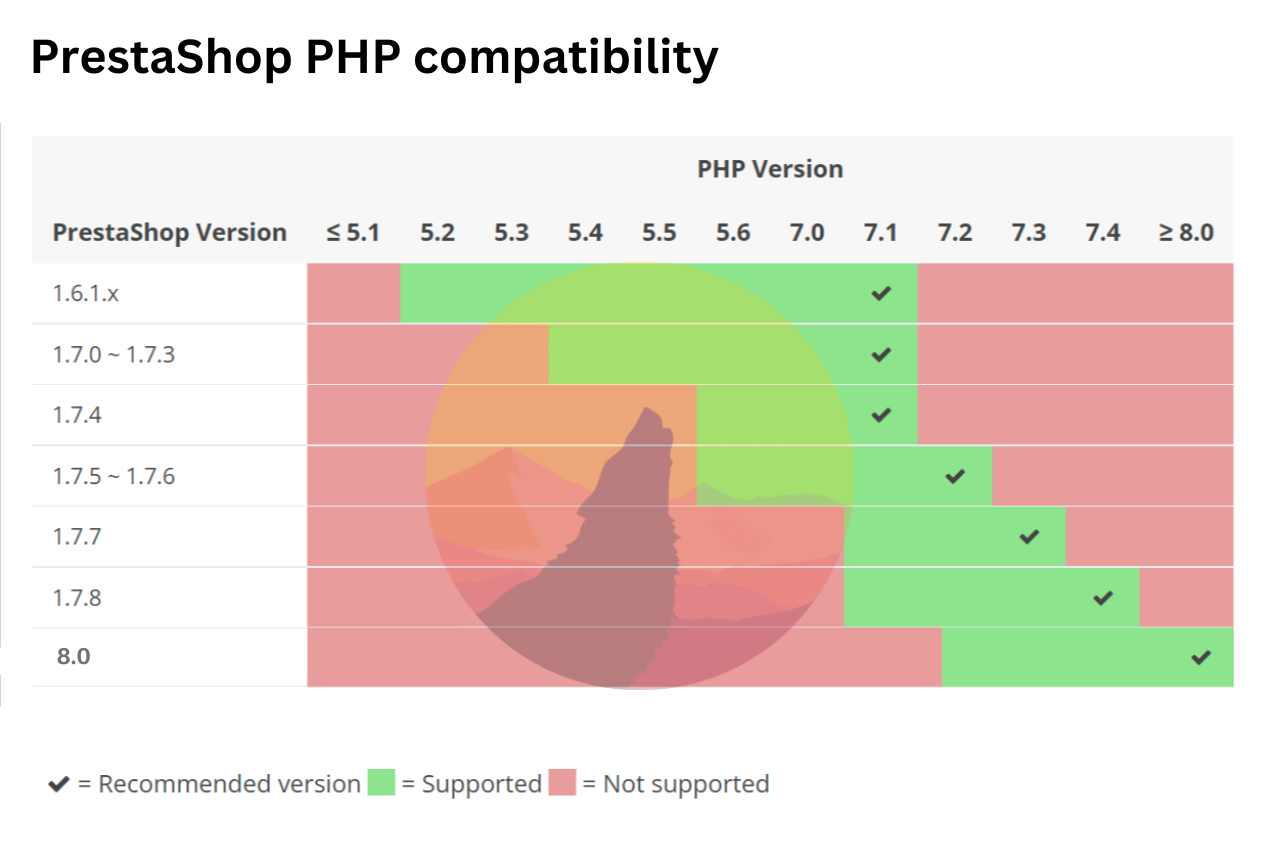
Our recommendation? It would be worthwhile to upgrade to the latest version 8.0 because at least it can significantly accelerate the performance of your PrestaShop store.
Are the supported versions of PHP not ready on your hosting? You need to contact your hosting provider to update PHP or change PHP version to a newer one for your account. If it's impossible, backup your website and find a better hosting.
You might want to access this link to learn more about new features on PrestaShop 8, or download this file to get the new version for PrestaShop installation.
PrestaShop 8.2 supports PHP 8.1 and PHP 8.2
PrestaShop 8.2, released in 2024, brought full support for PHP 8.2 alongside continued compatibility with PHP 8.1. This version introduced significant performance improvements and security patches. If you are running PrestaShop 8.x, we strongly recommend upgrading to PHP 8.2 for optimal speed and security.
Key PHP improvements in PS 8.2:
- Full PHP 8.2 support (readonly classes, DNF types)
- Improved memory usage and execution speed
- Better compatibility with modern hosting environments
PrestaShop 9.0 requires PHP 8.1 to 8.3
PrestaShop 9.0, the latest major release (2025), is built on the Symfony 6.4 framework and requires a minimum of PHP 8.1. It fully supports PHP 8.2 and PHP 8.3. Legacy PHP versions (7.x) are no longer supported.
PrestaShop 9 represents a major architectural shift:
- Symfony 6.4 LTS framework
- PHP 8.1 minimum, PHP 8.3 recommended
- MySQL 5.7+ or MariaDB 10.4+
- Modernized admin panel with Symfony controllers
- Improved module compatibility layer
Complete PrestaShop PHP Compatibility Table
| PrestaShop Version | Minimum PHP | Maximum PHP | Recommended PHP |
|---|---|---|---|
| PrestaShop 1.6.x | PHP 5.2 | PHP 7.1 | PHP 7.1 |
| PrestaShop 1.7.0 - 1.7.6 | PHP 5.4 | PHP 7.2 | PHP 7.2 |
| PrestaShop 1.7.7 - 1.7.8 | PHP 7.1 | PHP 7.4 | PHP 7.4 |
| PrestaShop 8.0.x | PHP 7.2.5 | PHP 8.1 | PHP 8.1 |
| PrestaShop 8.1.x | PHP 7.2.5 | PHP 8.1 | PHP 8.1 |
| PrestaShop 8.2.x | PHP 8.1 | PHP 8.2 | PHP 8.2 |
| PrestaShop 9.0 | PHP 8.1 | PHP 8.3 | PHP 8.3 |
How to Check Your Current PHP Version
To verify which PHP version is running on your PrestaShop server:
- Go to your PrestaShop Back Office > Advanced Parameters > Information
- Look for the Server Information section - your PHP version is displayed there
- Alternatively, create a
phpinfo.phpfile and access it via browser
Need help upgrading PHP? Contact your hosting provider or check our guide on PrestaShop system requirements for detailed server configuration instructions.
Related: PrestaShop 9 and PHP 8
Now that you know which PHP version your server needs, you may be planning to upgrade to PrestaShop 9. PHP 8.1 is the minimum requirement for PS9 — check our complete PrestaShop 9 guide covering all new features, system requirements, and migration steps. If you are installing PrestaShop 9 fresh, see our step-by-step installation guide.