 Cancel Order
 Logo Slider
 Cart Reservation
 Magic Menu
 PageSpeed
 DeleteX
 ChargeMe
 Age Restriction 18+
 DocumenThemix
 Agile Search
 Newsletter Popup
 IConvert Promotion
 Trusty Sale Proof
 Countdown x Bar
 Xleft
Xleft Jump to Checkout
 PrestaSEO AI++
 Accessibility Guard
 SOO Agent Gateway
 SOO Agent Catalog Tools
 SOO Agent SEO Tools
 GDPR
GDPR Create a new account
How to Choose an SEO Module for PrestaShop
Most "SEO module" listings sell the same four features: meta tags, sitemap, robots.txt, structured data. Those four are not the product. PrestaShop core already generates a sitemap and already lets you write a meta title by hand.
The module earns its price on one question: does it tell you what is wrong, or does it only let you fix things you already know about? A form that edits meta tags is a convenience. A report that finds the 40 products with duplicate titles is a different product.
What to check before you buy
1. Does it read your live indexation, not just your catalog?
A module that only queries your own database can tell you two products share a title. It cannot tell you Google refused to index a page. Indexation data lives in Search Console, and a module that connects to it finds problems the others structurally cannot.
2. Does it show the current value next to the proposed one?
Any tool that writes to your catalog must show what is there now. Without a before/after view you cannot review the change, and you cannot undo it.
3. Does it back up before it writes?
Ask directly. If the answer is no, the first bulk edit is irreversible.
4. Does it handle every language your store runs?
A store with four languages has four sets of meta tags. A module that writes only the default language leaves three quarters of your catalog untouched.
5. Can you undo a run?
One button that restores the previous values for a specific batch. Without it, a bad prompt on 400 products means restoring a database backup.
Four claims that mean nothing
| Claim | Why it carries no information |
|---|---|
| "AI-powered" | Says nothing about what it does. Ask what input it uses, what it writes, and whose API key it runs on — see below. |
| "100% SEO score" | A score invented by the tool. Google does not have a score. |
| "Optimises automatically" | Ask what it changes and whether it can be undone. |
| "Compatible with all themes" | Untestable. Ask for a refund policy instead. |
The "AI-powered" row is the one worth pressing on, because it hides a cost. A real example: PrestaSEO AI+ ships with an AI INTEGRATION section, and on a fresh install that row reports Key OPENAI — NEEDS API KEY. Until the merchant supplies one, every AI feature is off — while the audit, meta templates, meta manager, sitemap and 404 monitor all work without it.
That is not a defect. It is the honest architecture for an AI feature: the module does not resell you tokens, so you bring the key and pay the model bill directly. But it means "AI-powered" is a second purchase decision, not a feature on the invoice. Ask any vendor two questions:
- Which provider's key does this need, and can I change it?
- What still works if I never add one?
A vendor who cannot answer the second question is selling you a module that does nothing until you pay someone else.
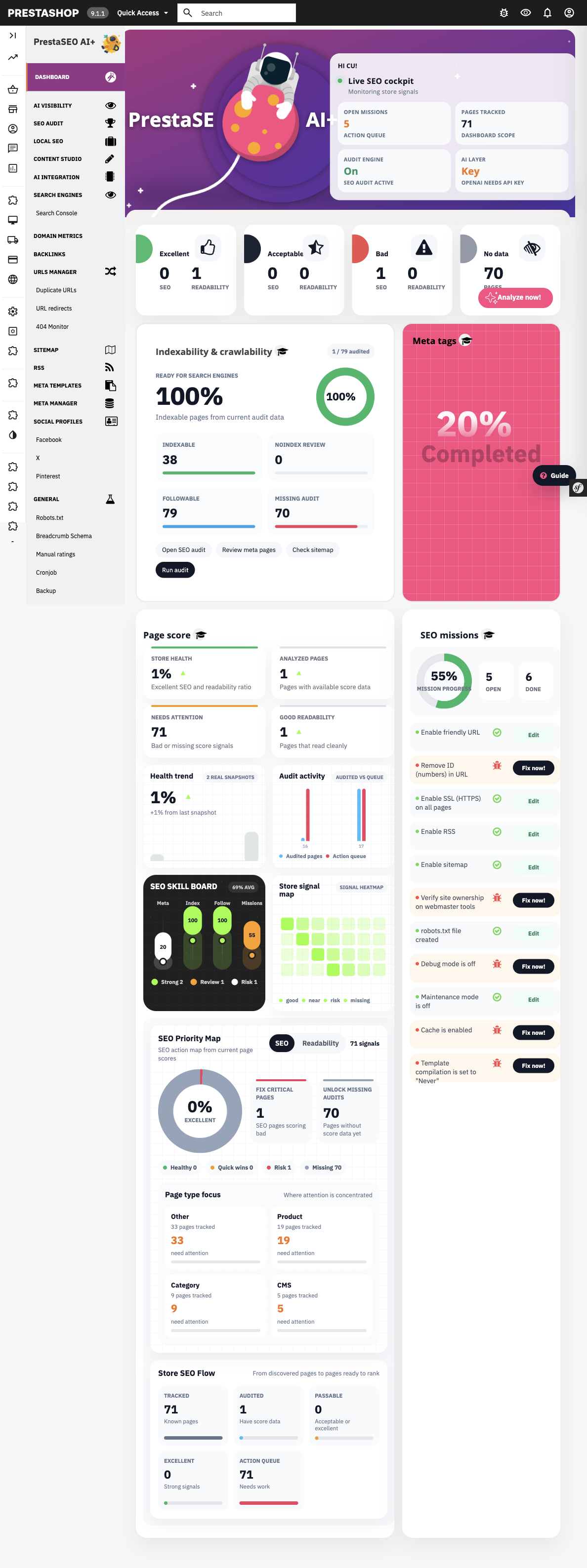
A real module screen on PrestaShop 9.1.1. The sidebar is where you can check the claims: does it connect to Search Console, does it keep backups, does it have a URL manager? You can answer all three before installing anything.
How to test one before you commit
- Install on a staging copy of the store, never the live one.
- Run it on 10 products only.
- Read the 10 proposed titles. Do any invent a claim, exceed 60 characters, or repeat the brand twice?
- Check what it wrote in every store language.
- Undo. If undo does not restore the exact previous values, stop here.
Ten products cost you twenty minutes and answer everything the sales page does not.
Read the config before you read the sales page
One thing you can do before installing anything: ask for the module's config.xml, or look at it once installed. It is a five-line file and it is not marketing copy. It gives you the technical name, the display name, the version and the author — the facts you need when you have to tell support which build you are on, and the fastest way to catch a module whose marketplace listing and shipped version disagree.
<name>soo_seo</name>
<displayName>PrestaSEO AI+</displayName>
<version>2.4.19</version>
<author>PrestaSOO</author>
<is_configurable>1</is_configurable>
The technical name matters more than the display name. The display name is what you see in the back office; the technical name is what the folder, the module key and every support conversation use. Two modules can share a display name and never share a technical name.
When the free module is enough
If you have under 50 products and one language, a free module that edits meta tags handles your whole catalog by hand in an afternoon. Buy when the catalog is too large to inspect yourself, or when you need indexation data you cannot see without Search Console access.
Related guides
- How to audit your PrestaShop store's SEO — the seven checks a module should shorten
- Generate AI meta titles and descriptions in PrestaShop — the workflow these guardrails protect
- All PrestaShop modules — module hub
- PrestaSEO AI — product CTA
Checklist
- ☐ Module reads Search Console indexation data, not only the database
- ☐ Before/after view exists for every field it writes
- ☐ Backup taken before the first bulk write
- ☐ All store languages covered
- ☐ Undo verified on a 10-product test run
- ☐ Tested on staging, not live
FAQ
Is a free SEO module enough for a small PrestaShop store? Under 50 products and one language, yes. The free modules edit meta tags correctly. They stop being enough when you cannot inspect the catalog yourself.
Can two SEO modules run at the same time? They should not. Two modules writing meta_title to the same table will overwrite each other, and the last one to run wins. Pick one.
Does an SEO module slow down the store? Only the ones that inject code into the front end on every request. A module that only runs in the back office has no front-end cost. Ask where it hooks.
What if the module breaks my theme? That is what the staging test is for. Never install a module that writes to front-end templates directly on the live store.

 PrestaSOO