Cancel Order
 Logo Slider
 Cart Reservation
 Magic Menu
 PageSpeed
 DeleteX
 ChargeMe
 Age Restriction 18+
 DocumenThemix
 Agile Search
 Newsletter Popup
 IConvert Promotion
 Trusty Sale Proof
 Countdown x Bar
 Xleft
Xleft Jump to Checkout
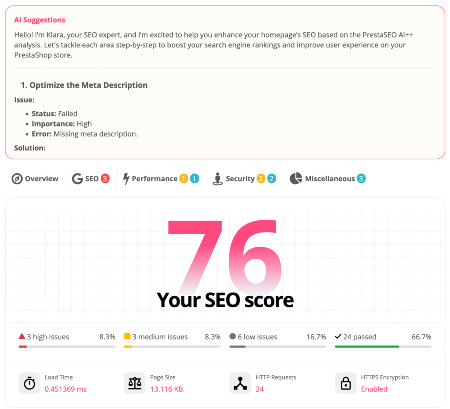
 PrestaSEO AI++
 Accessibility Guard
 SOO Agent Gateway
 SOO Agent Catalog Tools
 SOO Agent SEO Tools
 GDPR
GDPR Create a new account
Tabela kompatybilności wersji PHP PrestaShop
Która wersja PHP jest kompatybilna z PrestaShop? Krótka odpowiedź zależy od wersji PrestaShop: PrestaShop 9 wymaga PHP 8.1 lub nowszego, podczas gdy starsze sklepy PrestaShop 8, 1.7 i 1.6 wymagają bardziej rygorystycznego dopasowywania wersji.
Planujesz upgrade na PrestaShop 9 lub PHP?
Przed zmianą PHP lub przeniesieniem wersji przeanalizuj stos modułów, metadane SEO, przekierowania i dane strukturalne, aby aktualizacja nie zaszkodziła widoczności wyszukiwania.
Korzystaj z PrestaSEO AIPrzeczytaj listę kontrolną migracji na PS9
Szybka tabela kompatybilności z PHP PrestaShop
| Wersja PrestaShop | Kompatybilne wersje PHP | Zalecane działanie |
|---|---|---|
| PrestaShop 9.1 | PHP 8.1, 8.2, 8.3, 8.4, 8.5 | Korzystaj z najnowszego wspieranego PHP dostępnego na Twoim hostingu po testowaniu modułów. |
| PrestaShop 9.0 | PHP 8.1, 8.2, 8.3, 8.4 | Celuj w PHP 8.4 dla nowych wdrożeń PS9, gdy twoje moduły to obsługują. |
| PrestaShop 8.x | Specyficzne dla wersji; Zazwyczaj PHP 7.2.5-8.1 | Sprawdź dokładną wersję poboczną przed aktualizacją PHP. |
| PrestaShop 1.7.8 | Zazwyczaj PHP 7.2-7.4 | Nie przeskakuj do PHP 8 bez testów etapowych. |
| PrestaShop 1.6 | Środowiska starszych PHP 5.6-7.1 | Planuj migrację zamiast nowoczesnych aktualizacji PHP. |
Szczegóły dotyczące serwera znajdziesz w przewodniku po wymaganiach PrestaShop. Jeśli chodzi o ryzyko modułów, przeczytaj, jak sprawdzić kompatybilność modułów PrestaShop 9.
Spełnienie wymagań systemowych PrestaShop pomoże uniknąć nieoczekiwanych błędów w sklepie internetowym.
Zmiana obecnej wersji PHP na najnowszą na pewno przyspieszy Twój sklep; jednak każda wersja PrestaShop obsługuje tylko określone PHP.
Zobaczmy, z jaką wersją PHP będzie dostępny Twój sklep internetowy.

PrestaShop 1.6 obsługuje PHP w wersji 5.2 do 7.1
Ta wersja na PS została wydana w 2014 roku. Ten PS obsługuje PHP 5.2 do PHP 7.1. W tamtym czasie aktualizacja z PS 1.5 do 1.6 była bolesnym, niemal "rozbijającym się do odbudowy" procesem.
PrestaShop 1.7 jest kompatybilny z wersjami PHP 5.4 do 7.4
Pierwsza stabilna wersja PS 1.7 została wydana w listopadzie 2016 roku. Możesz zainstalować PHP 5.4 do PHP 7.4 na swoim serwerze WWW, aby hostować swój sklep internetowy.
Obecnie najczęściej używane są PHP 7.2, PHP 7.3 oraz PHP wersja 7.4.
PrestaShop 8 wymaga PHP 7.2.5 do 8.1 na twoim serwerze.
Najnowsza wersja PrestaShop została wydana w listopadzie 2022 roku. Najnowszy pakiet PrestaShop (obecnie PrestaShop 8.0.3) działa jako projekt open source i obsługuje najnowszą wersję PHP 8.1. Jest też kompatybilny z PHP 7.3 oraz z PHP 7.4.
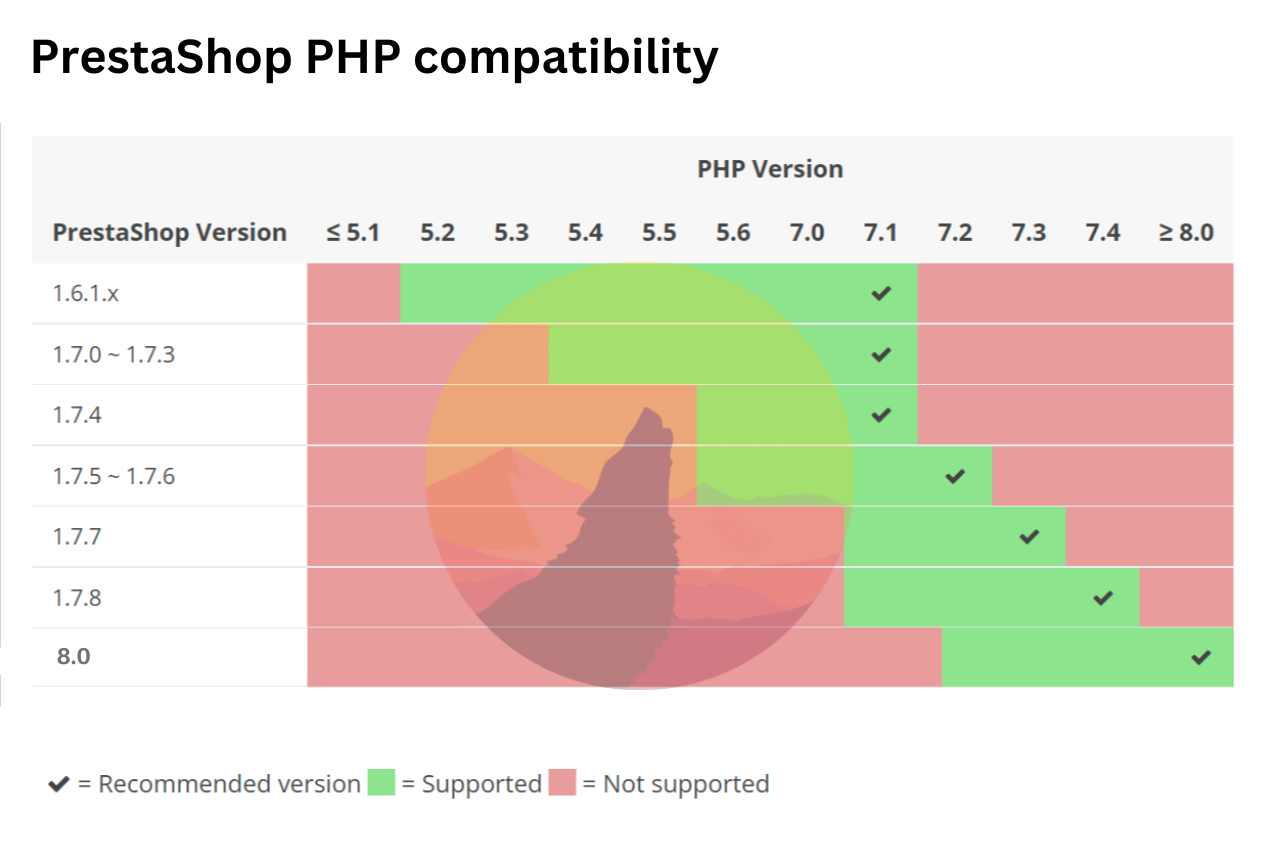
Nasza rekomendacja? Warto byłoby zaktualizować do najnowszej wersji 8.0, bo przynajmniej może to znacząco przyspieszyć wydajność Twojego sklepu PrestaShop.
Czy obsługiwane wersje PHP nie są gotowe na twoim hostingu? Musisz skontaktować się ze swoim dostawcą hostingu, aby zaktualizować PHP lub zmienić wersję PHP na nowszą dla swojego konta. Jeśli to niemożliwe, zrób kopię zapasową swojej strony i znajdź lepszy hosting.
Możesz chcieć skorzystać z tego linku, aby dowiedzieć się więcej o nowych funkcjach PrestaShop 8, albo pobrać ten plik , aby pobrać nową wersję do instalacji PrestaShop.
PrestaShop 8.2 obsługuje PHP 8.1 i PHP 8.2
PrestaShop 8.2, wydany w 2024 roku, zapewnił pełne wsparcie dla PHP 8.2 oraz ciągłą kompatybilność z PHP 8.1. Ta wersja wprowadziła znaczące ulepszenia wydajności i poprawki bezpieczeństwa. Jeśli korzystasz z PrestaShop 8.x, zdecydowanie zalecamy aktualizację do PHP 8.2 dla optymalnej szybkości i bezpieczeństwa.
Kluczowe ulepszenia PHP w PS 8.2:
- Pełne wsparcie dla PHP 8.2 (klasy tylko do odczytu, typy DNF)
- Poprawione wykorzystanie pamięci i szybkość wykonywania
- Lepsza kompatybilność z nowoczesnymi środowiskami hostingowymi
PrestaShop 9.0 wymaga PHP 8.1 do 8.3
PrestaShop 9.0, najnowsza duża wersja (2025), jest zbudowana na frameworku Symfony 6.4 i wymaga minimum PHP 8.1. W pełni obsługuje PHP 8.2 i PHP 8.3. Starsze wersje PHP (7.x) nie są już wspierane.
PrestaShop 9 to znacząca zmiana architektoniczna:
- Ramy Symfony 6.4 LTS
- Minimum 8,1 PHP, zalecane 8,3 PHP
- MySQL 5.7+ lub MariaDB 10.4+
- Zmodernizowany panel administracyjny z kontrolerami Symfony
- Ulepszona warstwa kompatybilności modułów
Kompletna tabela zgodności PrestaShop z PHP
| Wersja PrestaShop | Minimalny PHP | Maksymalny PHP | Zalecany PHP |
|---|---|---|---|
| PrestaShop 1.6.x | PHP 5.2 | PHP 7.1 | PHP 7.1 |
| PrestaShop 1.7.0 - 1.7.6 | PHP 5.4 | PHP 7.2 | PHP 7.2 |
| PrestaShop 1.7.7 - 1.7.8 | PHP 7.1 | PHP 7,4 | PHP 7,4 |
| PrestaShop 8.0.x | PHP 7.2.5 | PHP 8.1 | PHP 8.1 |
| PrestaShop 8.1.x | PHP 7.2.5 | PHP 8.1 | PHP 8.1 |
| PrestaShop 8.2.x | PHP 8.1 | PHP 8.2 | PHP 8.2 |
| PrestaShop 9.0 | PHP 8.1 | PHP 8.3 | PHP 8.3 |
Jak sprawdzić swoją obecną wersję PHP
Aby zweryfikować, która wersja PHP działa na Twoim serwerze PrestaShop:
- Wejdź do swojego PrestaShop Back Office > Zaawansowane Parametry > Informacje
- Szukaj sekcji Informacje o serwerze – tam jest wyświetlana wersja PHP
- Alternatywnie, utworzenie
phpinfo.phppliku i dostęp do niego przez przeglądarkę
Potrzebujesz pomocy z aktualizacją PHP? Skontaktuj się ze swoim dostawcą hostingu lub zapoznaj się z naszym przewodnikiem dotyczącym wymagań systemowych PrestaShop , aby uzyskać szczegółowe instrukcje konfiguracji serwera.
Powiązane: PrestaShop 9 i PHP 8
Teraz, gdy wiesz, jakiej wersji PHP potrzebuje Twój serwer, możesz planować aktualizację do PrestaShop 9. PHP 8.1 to minimalny wymóg dla PS9 — sprawdź nasz pełny przewodnik PrestaShop 9 , obejmujący wszystkie nowe funkcje, wymagania systemowe i kroki migracji. Jeśli instalujesz PrestaShop 9 na świeżo, zapoznaj się z naszym przewodnikiem krok po kroku po instalacji.