 Cancel Order
 Logo Slider
 Cart Reservation
 Magic Menu
 PageSpeed
 DeleteX
 ChargeMe
 Age Restriction 18+
 DocumenThemix
 Agile Search
 Newsletter Popup
 IConvert Promotion
 Trusty Sale Proof
 Countdown x Bar
 Xleft
Xleft Jump to Checkout
 PrestaSEO AI++
 Accessibility Guard
 SOO Agent Gateway
 SOO Agent Catalog Tools
 SOO Agent SEO Tools
 GDPR
GDPR Create a new account
Generate AI Meta Titles & Descriptions in PrestaShop
Writing a meta title by hand takes two minutes. A store with 400 products takes 13 hours. That is why most PrestaShop stores have empty or duplicated meta descriptions — nobody has the time.
An AI generator removes the typing. The problem is that raw AI output is inconsistent: some titles come out at 90 characters, some repeat the shop name, some invent a benefit the product does not have. Those three failures each cost you clicks. This guide covers the workflow that avoids them.
Where this lives in PrestaSEO AI+
The module installs its own screen in the back office, separate from Catalog → Products. Its sidebar has these sections, and two of them are the ones this guide uses:
| Section | What it holds |
|---|---|
DASHBOARD | SEO cockpit — audited pages, action queue, store health |
AI VISIBILITY | how the store appears to AI assistants |
SEO AUDIT | per-page audit with SEO and readability scores |
LOCAL SEO | local business data |
CONTENT STUDIO | content generation |
AI INTEGRATION | the API key — see the warning below |
SEARCH ENGINES | Search Console, domain metrics, backlinks |
URLS MANAGER | duplicate URLs, URL redirects, 404 monitor |
SITEMAP, RSS | sitemap and feed settings |
META TEMPLATES | the rules that decide the shape of every generated title |
META MANAGER | the bulk editor where titles get generated and written back |
SOCIAL PROFILES | Facebook, X, Pinterest |
GENERAL | robots.txt, breadcrumb, schema, manual ratings, cronjob, backup |
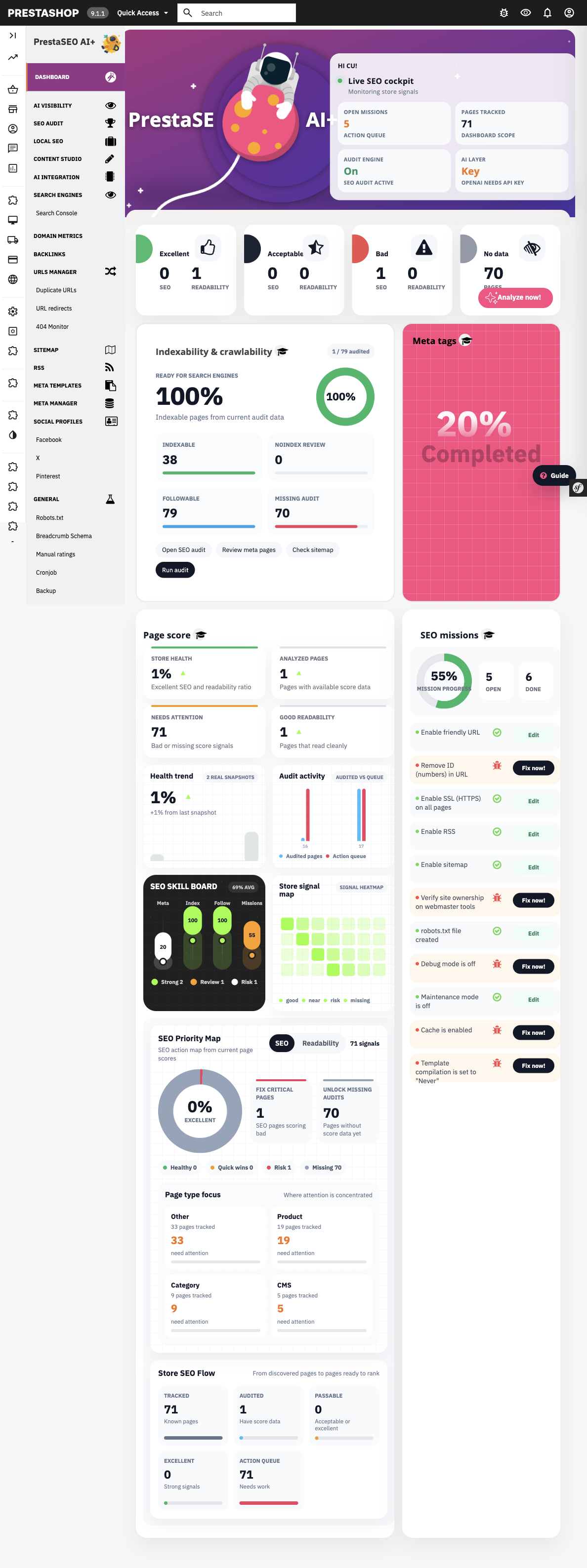
PrestaSEO AI+ 2.4.19 on PrestaShop 9.1.1. META TEMPLATES and META MANAGER in the sidebar are the two screens this guide is about.
> Read this before you plan the work. The AI layer needs its own API key. > On a fresh install the AI INTEGRATION row reports Key OPENAI — NEEDS API > KEY, and every AI feature stays switched off until you add one. That is a > separate account and a separate bill from the module licence. Decide who pays > for that before you promise a client AI-generated meta text.
What "good" means before you generate anything
Four rules. Every generated row must pass all four.
| Rule | Value | Why |
|---|---|---|
| Title length | 30–60 characters | Under 30 looks thin, over 60 gets cut |
| Description length | 70–155 characters | Same reason |
| No invented claims | No price, no stock, no rating, no "best" | Search engines compare the snippet to the page |
| Brand placement | At the end, once | Repeating the brand wastes the characters that carry the keyword |
Set these as constraints in the tool. Do not review 400 rows by hand afterwards — constrain the output instead.
Step by step
1. Set the length rules in META TEMPLATES first
Do this before generating anything. META TEMPLATES is where the shape of every title is defined — the pattern, the fields it pulls, the length limits. Get this right and most of the review work disappears; get it wrong and you are editing the output by hand instead of the rule that produced it.
2. Export your current titles and descriptions
The generator needs to know what you already have. It should skip products that already have a good title, so you do not overwrite pages that rank.
3. Generate with the product data as input, not the product name alone
Bad input: the product name. You get a title that paraphrases the name.
Good input: product name, category, key attributes, and what the product is for. The generator can then produce a title that includes the attribute buyers actually search for.
4. Review by exception, not by row
In META MANAGER, sort by length and check only what falls outside 30–60 and 70–155. In practice that is 10–20% of the rows. Fix those, accept the rest.
5. Write back to PrestaShop
Write the meta_title and meta_description fields for each product, in every language the store runs. Do not write anything else — not the product description, not the URL, not the category. META MANAGER is the screen that does the write-back; GENERAL → Backup is where the module keeps its own copy of what it changed, so take one before a large run.
6. Tell Google the pages changed
Submit the changed URLs in Search Console. The module reads Search Console data under SEARCH ENGINES, so if you have connected it there you already have the property set up. Without a submission, Google keeps showing the old snippet for weeks.
What not to automate
- Product descriptions. Google is stricter about AI text on the pages that carry the buying decision. Titles and meta are low risk; body copy is not.
- URL keys. Changing a slug after publication breaks every incoming link. PrestaShop does not redirect old slugs automatically.
- Category meta. A category page carries more ranking weight than a product page. Write those by hand.
Related guides
- How to audit your PrestaShop store's SEO — measure title length and duplicates before you generate
- PrestaSEO AI — module hub
- PrestaSEO AI pricing — product CTA
Checklist
- ☐ API key added in
AI INTEGRATION(AI stays off without one) - ☐ Length rules set in
META TEMPLATESbefore generating - ☐ Module backup taken (
GENERAL → Backup) - ☐ Current titles and descriptions exported
- ☐ Products that already rank excluded from the run
- ☐ Output reviewed by exception in
META MANAGER(out-of-range rows only) - ☐ Written to all store languages
- ☐ Changed URLs submitted in Search Console
FAQ
Does the AI part work out of the box? No. The module ships without an API key, and its AI INTEGRATION row shows Key OPENAI — NEEDS API KEY until you add one. Everything that does not use the AI layer — the audit, META TEMPLATES, META MANAGER, the sitemap, the 404 monitor — works without it.
Will AI-generated meta titles get my site penalised? Search engines penalise spam at scale, not machine-written text as such. Titles that accurately describe the page are fine. Titles that repeat a keyword five times are a risk, whether a human or a model wrote them.
Can I use this for a store in French or Spanish? Yes, and this is where the gain is largest — few merchants write native meta text for every language. Generate per language, and keep the brand name and module names untranslated.
Should I generate meta descriptions at all if Google rewrites them? Generate them anyway. Google rewrites a share of all snippets, but a well-written description is used more often than an empty one — and an empty one is rewritten every time.
What about the products that already have a good title? Leave them. Overwriting a title on a page that ranks is the most expensive mistake in this workflow. That is what step 1 is for.

 PrestaSOO