 Cancel Order
 Logo Slider
 Cart Reservation
 Magic Menu
 PageSpeed
 DeleteX
 ChargeMe
 Age Restriction 18+
 DocumenThemix
 Agile Search
 Newsletter Popup
 IConvert Promotion
 Trusty Sale Proof
 Countdown x Bar
 Xleft
Xleft Jump to Checkout
 PrestaSEO AI++
 Accessibility Guard
 SOO Agent Gateway
 SOO Agent Catalog Tools
 SOO Agent SEO Tools
 GDPR
GDPR Create a new account
How to Audit Your PrestaShop Store's SEO (Step by Step)
An SEO audit is not a document you buy. It is seven checks, and each one ends with a number. Once you have the seven numbers you know what to fix and in what order. Budget about 90 minutes for a store with under 500 products.
Do not fix anything until all seven checks are done. Fixing the first thing you find usually means fixing the wrong thing first.
1. Indexation — is Google allowed to see the page?
Search Console → Indexing → Pages
Read the "Not indexed" table. The reasons matter more than the count:
| Reason | What it usually means |
|---|---|
| Excluded by 'noindex' tag | A module or template added it. Check product and CMS pages first. |
| Crawled — currently not indexed | Thin or duplicate content. Usually category filters. |
| Discovered — currently not indexed | Crawl budget spent on low-value URLs. Usually pagination and filters. |
| Alternate page with proper canonical | Normal, as long as the canonical is the page you want to rank. |
| Duplicate without user-selected canonical | You have a canonical problem. Read check 3. |
The number you want: the count of "Crawled — currently not indexed". If it grows month over month, you are publishing pages Google will not keep.
2. Title and meta length
Every title over 60 characters gets cut in the results page. Every meta description over 155 characters gets cut too.
Catalog → Products, open a product, and check the SEO tab on your ten best-selling products.
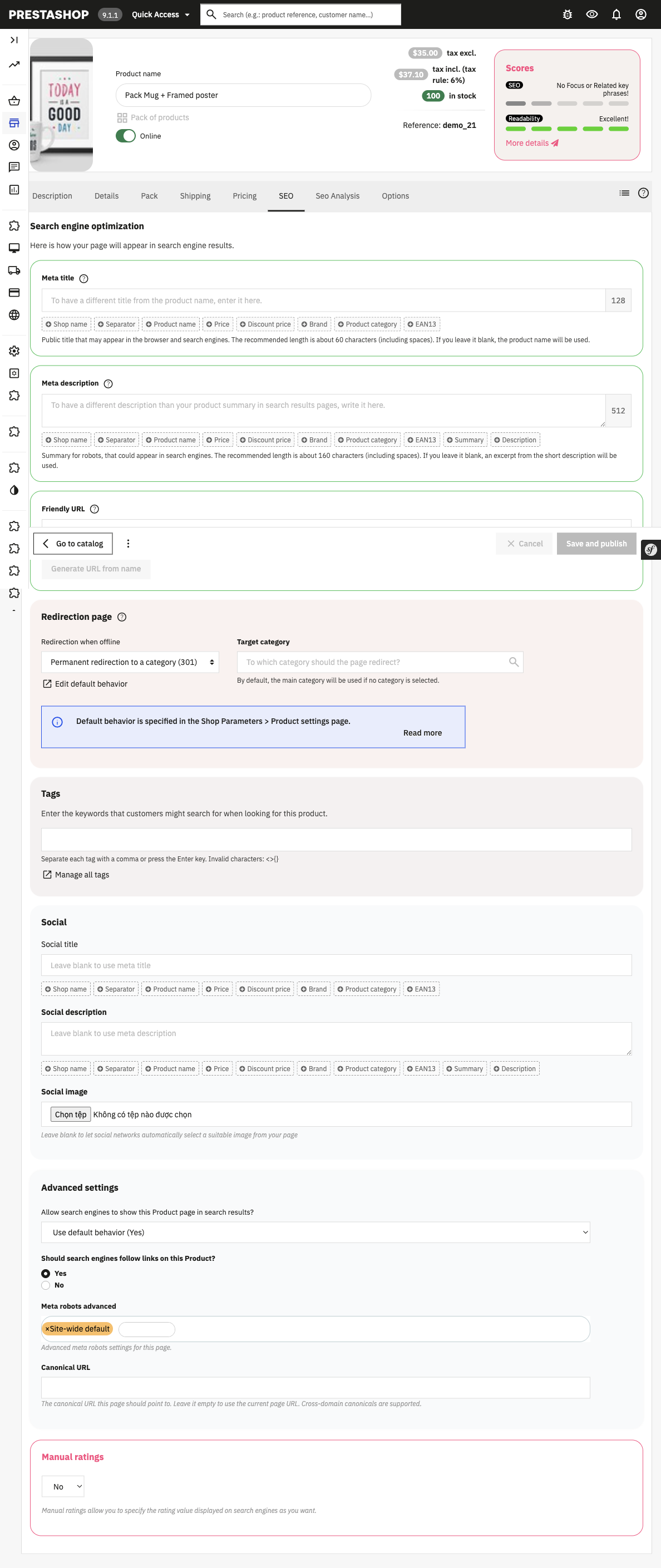
In PrestaShop 9.1.1 the meta title, meta description and friendly URL for a product all live on the SEO tab of the product page — not on a separate screen.
Then check your top five category pages. In PrestaShop 9 the category title and meta are edited on the category's own page: Catalog → Categories, then open the category.
The number you want: how many of your 20 most valuable URLs have a title longer than 60 characters. Fix those 20 before you touch anything else — the pages that already rank gain the most from a title rewrite.
3. Duplicate titles
Two pages with the same title compete with each other. Google picks one and ignores the other, and it does not always pick the one you wanted.
The common sources in PrestaShop:
- Category pages and their first pagination page.
CategoryandCategory?page=2can carry the same title. - Product pages and their combinations. A product with 20 colour combinations must not generate 20 indexable URLs.
- Manufacturer and supplier pages with an empty meta title.
The number you want: the count of duplicate titles across your indexable URLs. Zero is the target.
4. Redirects and 404s
In Search Console, open the Page indexing report and filter it to Not found (404). Google moved this report more than once, so go by the report name rather than a click path copied from an old guide.
In PrestaShop a deleted product leaves a 404 unless you redirect it. Each 404 on a URL that used to get traffic is lost revenue.
Build the redirect list in Shop Parameters → Traffic & SEO → SEO & URLs. The screen is called URL redirects, and its columns are all you need to plan the work:
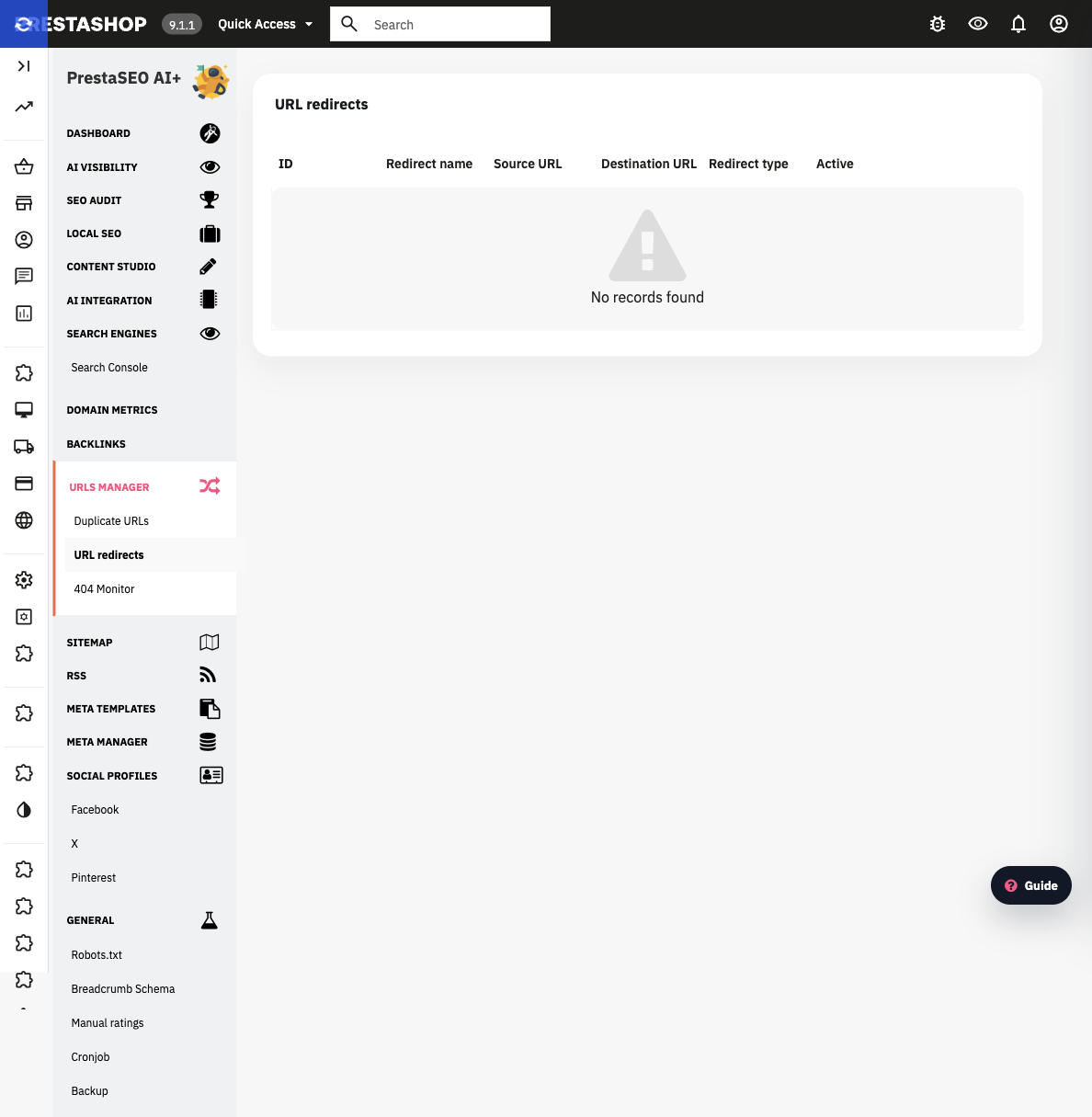
Shop Parameters → Traffic & SEO → SEO & URLs → URL redirects. The table on the demo store is empty — that is the point. The five columns are the whole data model, and there is no import field anywhere on this screen.
That is the constraint worth knowing before you plan: PrestaShop core has no bulk redirect importer. You add redirects one row at a time, and each row needs a name, a source URL, a destination URL, a redirect type and an active flag. For a store with dozens of dead URLs that is a module or a server-level rule, not a back-office afternoon.
The number you want: 404s that had clicks in the last 90 days. Redirect every one of them.
5. Structured data
Run one product page and one category page through Google's Rich Results Test.
A PrestaShop product page should expose Product with offers, price and availability. Missing structured data means missing price and stock badges in the results, which lowers click-through even when your position is unchanged.
The number you want: how many of your page types have valid structured data. Four is the target: product, category, article, breadcrumb.
6. Internal links
Internal links are how you tell Google which pages matter. In PrestaShop the usual hole is that your best products are only reachable from the category listing, never from the home page or from other content.
The number you want: how many clicks it takes to reach your top-ten revenue products from the home page. Three or fewer is healthy.
7. Content gap
The last check is the one that decides your growth curve. Compare what you sell against what people search for.
Take your module list or your product list. For each one, ask: does a page on this site answer the question a buyer types before they buy? For most PrestaShop stores, the answer is no — the site has product pages but no how-to pages.
The number you want: the count of buying-intent queries where you have impressions but no dedicated page. Those are the articles to write next.
Fix in this order
- Titles and meta on pages that already rank (fastest win, check 2).
- Duplicate titles and canonical tags (check 3).
- Redirects for 404s that had clicks (check 4).
- Structured data on product and category pages (check 5).
- Internal links from the home page (check 6).
- New articles for the content gap (check 7).
- Indexation cleanup last — it usually resolves itself once 1–6 are done.
Related guides
- How to speed up a PrestaShop store — page speed is the eighth check, and it is worth its own guide
- PrestaShop image settings explained — the setting that quietly breaks your
og:image - PrestaSEO AI — runs checks 2, 3 and 5 automatically and writes the corrections
Checklist
- ☐ "Crawled — currently not indexed" count recorded
- ☐ Titles over 60 chars on top-20 URLs found
- ☐ Duplicate titles counted
- ☐ 404s with clicks in 90 days redirected
- ☐ Rich Results Test run on product and category
- ☐ Click distance to top-10 products measured
- ☐ Buying-intent queries without a page listed
FAQ
How often should I audit a PrestaShop store? A full audit quarterly. Checks 2 and 4 monthly — those two rot fastest because every product launch changes them.
Can I audit without Search Console access? Partly. Checks 2, 3 and 5 are visible from the store itself. Checks 1, 4 and 7 need Search Console, because only Google knows what it indexed and what it showed.
Is a paid SEO audit tool worth it for one store? For a single store, the seven checks above cover most of what a crawler reports. A crawler earns its cost when you have thousands of URLs and need them all checked in one pass.
My site has no 404s and no duplicate titles. What is left? Then your problem is almost always check 7 — content gap. Technical hygiene gets you indexed; it does not get you ranked for queries you have no page for.

 PrestaSOO