Cancel Order
 Logo Slider
 Cart Reservation
 Magic Menu
 PageSpeed
 DeleteX
 ChargeMe
 Age Restriction 18+
 DocumenThemix
 Agile Search
 Newsletter Popup
 IConvert Promotion
 Trusty Sale Proof
 Countdown x Bar
 Xleft
Xleft Jump to Checkout
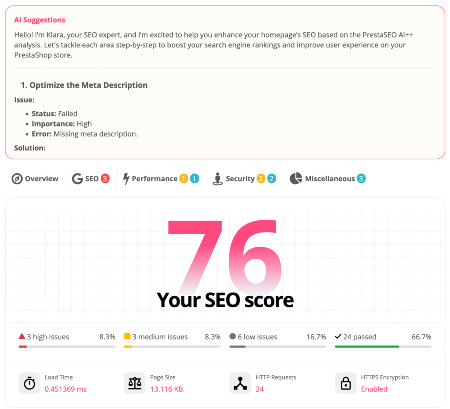
 PrestaSEO AI++
 Accessibility Guard
 SOO Agent Gateway
 SOO Agent Catalog Tools
 SOO Agent SEO Tools
 GDPR
GDPR Create a new account
PrestaShop Technical SEO Audit Checklist: Hreflang, Clean URLs, Schema
Technical SEO for PrestaShop is rarely one issue. It is usually a stack of small problems across multilingual URLs, canonical tags, duplicate pages, structured data, sitemaps, redirects, and slow templates.
Use this checklist before a migration, redesign, or major module rollout so search engines can crawl and interpret the store correctly.
Validate Hreflang Across Every Language
A PrestaShop hreflang fix starts by checking reciprocal language annotations, canonical consistency, localized URLs, and missing alternates. Multilingual stores should verify real rendered HTML, not only backend settings.
Review Clean URLs and Canonical Rules
Clean URL PrestaShop 9 setups should avoid duplicate slash variants, parameter duplicates, category-path conflicts, and legacy redirects. Canonicals must point to indexable URLs that match the intended language and product state.
Check Schema Markup Against Visible Content
A PrestaShop schema markup module should output product data that matches the page: price, availability, reviews, brand, image, and SKU. Mismatched structured data can be ignored or create Search Console warnings.
Use Automation for Recurring Audit Tasks
PrestaSEO AI can support repeatable SEO QA by flagging missing metadata, weak snippets, and product pages that need review after catalog changes.
Prioritize Fixes by Crawl and Revenue Impact
Fix indexing blockers, wrong canonicals, broken redirects, and product structured-data errors before cosmetic SEO tasks. Technical SEO should protect pages that can actually drive search revenue.
Helpful Public References
Frequently Asked Questions
How often should I run a PrestaShop technical SEO audit?
Run a focused audit after every migration, redesign, theme update, SEO module change, or major catalog import. For active stores, monthly checks are sensible.
What is the fastest hreflang mistake to find?
Look for pages where language alternates are missing, non-reciprocal, canonicalized to another language, or returning non-200 status codes.
Next step: review PrestaSEO AI for PrestaShop if you want this workflow closer to your store operations.