Cancel Order
 Logo Slider
 Cart Reservation
 Magic Menu
 PageSpeed
 DeleteX
 ChargeMe
 Age Restriction 18+
 DocumenThemix
 Agile Search
 Newsletter Popup
 IConvert Promotion
 Trusty Sale Proof
 Countdown x Bar
 Xleft
Xleft Jump to Checkout
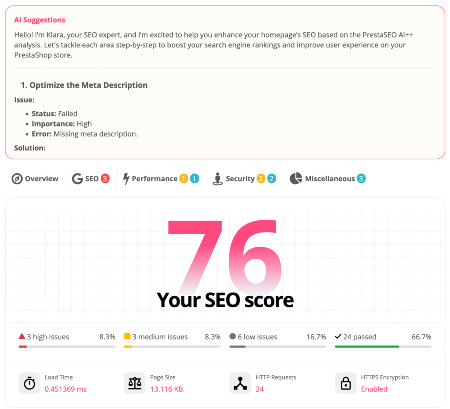
 PrestaSEO AI++
 Accessibility Guard
 SOO Agent Gateway
 SOO Agent Catalog Tools
 SOO Agent SEO Tools
 GDPR
GDPR Create a new account
PrestaShop SEO Audit Checklist
A PrestaShop SEO audit should not be a vague list of warnings. It should show which pages search engines can crawl, which pages deserve to rank, and which issues are blocking clicks or conversions.
This checklist focuses on practical work: crawl control, indexability, metadata, internal links, redirects, page speed, content quality and Search Console evidence. It is written for store owners who need action, not theory.
Start with crawl and indexation
- Confirm the live domain is not blocked by robots.txt, noindex tags, password protection or staging rules.
- Check that canonical tags point to the preferred URL and do not conflict with language, pagination or filter pages.
- Review XML sitemaps and remove URLs that should not be indexed, including search pages, temporary campaign URLs and duplicate filtered paths.
PrestaShop stores often create crawl noise through faceted navigation, sort orders, layered filters and duplicated category paths. If Google spends time on weak variants, important products and categories may be crawled less often.
Review metadata and page intent
- Find missing, duplicated or overly generic title tags across products, categories, CMS pages and blog content.
- Compare the page title, H1, intro copy and internal anchors to make sure they target the same intent.
- Prioritize URLs that already have impressions but low CTR, because metadata can create fast gains there.
A good audit separates pages that need a better snippet from pages that need a stronger offer or deeper content. For a more focused workflow, use the PrestaShop meta tags guide after this audit.
Map internal links to commercial priorities
- Check whether strategic categories are reachable within a few clicks from the homepage.
- Find orphan pages that exist but are not meaningfully linked from categories, blog posts or CMS pages.
- Add contextual links from informational articles to relevant commercial pages, using natural anchor text.
Internal links tell users and search engines which pages matter. A useful article about PrestaShop SEO can support a relevant module page such as PrestaSEO AI+ without turning the article into a sales page.
Check speed, mobile layout and redirects
- Test the templates that repeat across the store: product, category, CMS, blog and checkout-adjacent pages.
- Look for oversized images, heavy scripts, slow third-party widgets and layout shifts on mobile.
- Clean redirect chains, soft 404s, deleted products with backlinks and old category URLs after migrations.
Template-level fixes usually beat one-page fixes. If one product template has a technical issue, many URLs probably share the same weakness.
Turn the audit into a short action list
- Use Search Console to find pages with impressions, weak CTR and average positions between 5 and 20.
- Classify each issue as crawl, metadata, content, internal link, redirect or performance.
- Fix the highest-impact pages first and measure the result after Google recrawls them.
The audit should end with decisions: keep, improve, merge, redirect, deindex or support with links. That is also where a tool like PrestaSEO AI+ can help centralize findings and turn them into page-level tasks.
The best SEO work is not the work that creates the most reports. It is the work that helps the store owner decide what to fix next, publish cleaner pages and measure whether Google responds.